The modern professional landscape has fundamentally shifted, transitioning from rigid, location-bound corporate structures to highly dynamic, distributed environments. In this new era of work, the physical boardroom is no longer the sole locus of decision-making.
Instead, collaboration occurs across continents, time zones, and flexible physical environments. To sustain this level of operational agility, organizations must rely on advanced digital tools. Consequently, utilizing smart apps for seamless meetings has transformed from a mere convenience into an absolute operational necessity.
A successful meeting today requires far more than a simple video link. It demands an interconnected ecosystem of software and hardware that can facilitate scheduling, automate documentation, enhance audio-visual clarity, and integrate flawlessly with physical infrastructure. Whether a team is entirely remote or operating out of a managed office space, the underlying technology must act as an invisible facilitator, removing friction and allowing professionals to focus entirely on their strategic objectives.
This comprehensive guide explores the principles behind modern meeting technology, detailing the core features of these applications, their integration into flexible workspaces, and best practices for deployment. By understanding how to leverage these digital ecosystems, organizations can build a more cohesive, productive, and resilient workforce.
Evolution and Role of Smart Apps for Seamless Meetings
The concept of the business meeting has undergone a radical digital transformation. Historically, organizing a collaboration session required manual calendar coordination, physical room reservations, and the distribution of printed agendas. Today, smart apps for seamless meetings handle these logistical hurdles instantaneously through sophisticated algorithms and cloud synchronization.
A “smart” meeting application is defined by its ability to automate administrative tasks and bridge the gap between various communication channels. These platforms are designed around the principle of interoperability—meaning they communicate not just with users, but with other software tools like customer relationship management (CRM) systems, project management boards, and digital calendars.
Furthermore, the role of these applications extends beyond the duration of the meeting itself. They encompass the entire lifecycle of a collaborative session:
- Pre-meeting: Automating invitations, cross-referencing availability, and distributing preliminary materials
- In-meeting: Facilitating high-definition communication, interactive whiteboarding, and real-time screen sharing.
- Post-meeting: Generating actionable summaries, distributing recorded files, and assigning follow-up tasks to specific team members.
By addressing the complete lifecycle of collaboration, these applications eliminate the fragmented workflows that often lead to miscommunication and lost productivity.
Key Takeaways: The Evolution of Meeting Apps
- Smart meeting apps manage the entire collaboration lifecycle: pre-meeting, in-meeting, and post-meeting.
- Interoperability with existing software (like CRMs and digital calendars) is a defining characteristic of a smart application.
- The primary goal of these tools is to remove administrative friction, allowing users to focus on strategic execution.
Core Features of a Modern Meeting Ecosystem
To truly qualify as a smart tool for seamless collaboration, an application must possess a specific set of features designed to mitigate the common challenges of distributed work. The most effective digital ecosystems generally incorporate the following core functionalities:
Intelligent Scheduling and Room Booking
One of the most persistent bottlenecks in professional collaboration is finding a mutually agreeable time for multiple stakeholders. Intelligent scheduling tools utilize backend algorithms to cross-reference the digital calendars of all participants, automatically identifying overlapping windows of availability.
Furthermore, these tools account for varying time zones, eliminating the confusion inherent in global communication. When integrated with physical workspaces, these scheduling tools can also communicate directly with the local network to reserve a physical conference room, ensuring that space is available when local participants arrive.
Advanced Audio and Video Processing
The principle of seamless communication relies heavily on audio-visual clarity. Modern smart meeting apps utilize:
- Advanced processing techniques to ensure high-fidelity transmission even in fluctuating network conditions.
- Adaptive bitrate streaming to adjust the video quality in real-time based on the user’s internet bandwidth.
- Software filters to isolate human vocal frequencies while dampening ambient distractions, such as keyboard typing or street noise.
Real-Time Collaborative Artifacts
Verbal communication is often insufficient for complex problem-solving. Therefore, smart apps for seamless meetings incorporate digital artifacts, such as virtual whiteboards, shared document editing, and interactive polling.
These features allow participants to ideate visually and simultaneously. Changes made by one user are instantly reflected on the screens of all others, creating a shared digital environment that mimics the dynamic nature of an in-person workshop.
Automated Documentation and Action Items
The integration of Artificial Intelligence (AI) has significantly enhanced the post-meeting phase. Through natural language processing and speech-to-text transcription, smart applications can document conversations in real-time.
More advanced iterations of this technology can identify different speakers, highlight key decisions, and automatically draft a summary of action items. This functional capability ensures that institutional knowledge is preserved and that individuals who could not attend the meeting can quickly catch up on the outcomes.
Key Takeaways: Core Features
- Intelligent scheduling resolves time-zone conflicts and automates the discovery of mutual availability.
- Adaptive bitrate streaming and noise suppression are critical for maintaining clear communication in varying environments.
- Virtual whiteboards and real-time document editing support synchronous, visual problem-solving.
- AI-driven transcription and summarization preserve knowledge and streamline the post-meeting workflow.
Enhancing Productivity in Flexible Workspaces
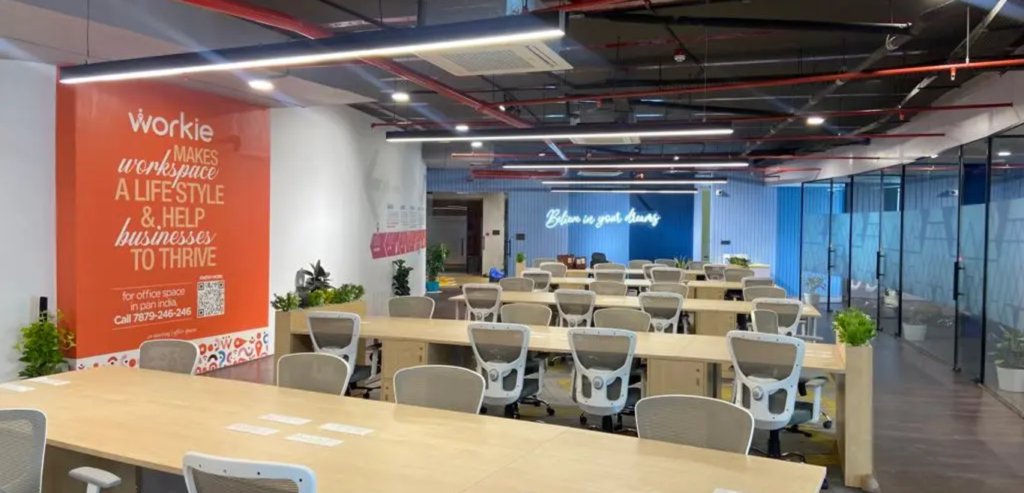
The rise of digital meeting tools has directly paralleled the rise of flexible work environments. As companies shift away from traditional, centralized headquarters, they increasingly rely on regional hubs to house their workforce. Integrating smart apps for seamless meetings into a managed office space, for instance, requires a thoughtful approach to both software and physical infrastructure.
Noida has established itself as a premier destination for corporate enterprise and technology innovation. A modern managed office space in Noida is specifically designed to cater to agile teams that require enterprise-grade facilities without the overhead of traditional commercial real estate. In these environments, the synergy between a user’s digital application and the physical room is paramount.
For example, a mid-size technology team might utilize a managed facility that features Internet of Things (IoT) integrated meeting rooms. When a team member uses a smart app to schedule a meeting, the software communicates via an API (Application Programming Interface) to the building’s management system.
This process reserves the physical room, updates the digital display panel outside the door to show an “occupied” status, and can even trigger the room’s HVAC and lighting systems to turn on just prior to the meeting’s start time.
Once inside the room, participants rely on casting technologies to instantly mirror their laptop screens or mobile devices to the main presentation monitor. This wireless casting eliminates the need for complex cabling and adapters, fulfilling the promise of a truly seamless start to the meeting.
The physical architecture of the room—such as acoustic paneling and optimized lighting—works in tandem with the software’s background blur and noise-cancellation features to project a highly professional image to remote attendees.
Key Takeaways: Flexible Workspace Integration
- The synergy between digital scheduling apps and physical room hardware creates a frictionless user experience.
- A well-equipped managed office space in Noida utilizes IoT integration to automate room reservations and environmental controls.
- Wireless casting and dedicated presentation monitors eliminate hardware troubleshooting, allowing meetings to begin instantly.
Navigating the Hybrid Meeting Challenge
Hybrid meetings—where some participants are gathered in a single physical location while others dial in remotely—present a unique set of challenges. Without the proper deployment of smart apps for seamless meetings, a dynamic known as “presence disparity” can occur. This happens when the individuals in the physical room dominate the conversation, leaving remote participants feeling isolated and disconnected from the collaborative process.
To neutralize presence disparity, businesses operating out of dynamic locations like coworking spaces in Delhi must adopt inclusive technological practices. It often hosts a diverse array of professionals, from independent contractors to satellite enterprise teams. When these professionals connect with global counterparts, the technology must level the playing field.
For example, a hybrid team might utilize an ecosystem that features smart camera framing. If five people are seated in a conference room, a smart camera system uses facial recognition and spatial mapping to crop and display each individual in their own separate video pane on the digital meeting platform.
To the remote user, it appears as though everyone is joining from individual screens, rather than viewing a wide, distant shot of a crowded room. This principle of visual equity ensures that remote participants can easily read the facial expressions and body language of those in the physical office.
Furthermore, smart apps facilitate an inclusive chat and Q&A environment. In a hybrid setting, remote attendees can utilize integrated digital hand-raising features or submit questions through a text-based chat.
A designated meeting facilitator can monitor this digital dashboard, ensuring that the workflow of the physical room pauses to address the input of off-site team members. By leveraging these specific application features, organizations can ensure that location does not dictate the value of a participant’s contribution.
Key Takeaways: Navigating Hybrid Challenges
- Presence disparity is a major risk in hybrid meetings, potentially isolating remote workers.
- Operating in a coworking space requires tools that promote visual and auditory equity, such as smart camera framing.
- Digital hand-raising and integrated chat features ensure that remote participants have equal opportunity to contribute to the discussion.
The Infrastructure Behind the App: Let’s Connect India
The most sophisticated smart apps for seamless meetings will inevitably underperform if deployed within an environment lacking the proper foundational infrastructure. Network stability, ergonomic design, and secure connectivity are the bedrock upon which successful digital collaboration is built. This is where forward-thinking workspace providers become crucial partners in the operational strategies of modern businesses.
Let’s Connect India represents a paradigm of how workspace providers design environments specifically engineered to support advanced software ecosystems. As a provider of flexible, professional work environments, Let’s Connect designs its facilities with the understanding that high-bandwidth software applications are running continuously.
To ensure that teams can maximize the utility of their smart applications, an optimal flexible workspace must provide enterprise-grade internet connectivity. Because video conferencing, large file transfers, and real-time cloud syncing demand significant and stable bandwidth, environments provided by Let’s Connect India prioritize robust IT infrastructure. This ensures that features like adaptive bitrate streaming and real-time document collaboration function without latency.
Moreover, the physical layout of the environment is deeply intertwined with application usage. Soundproofed private cabins and acoustically treated meeting rooms prevent confidential audio from leaking into communal areas, while simultaneously preventing ambient noise from triggering a smart app’s microphone.
By investing in ergonomic furniture and strategically placed power receptacles, flexible workspaces ensure that professionals can engage in lengthy digital collaborations without physical discomfort or battery depletion. Let’s Connect India approaches workspace management not merely as a real estate offering, but as a holistic physical platform that enables sophisticated digital workflows.
Key Takeaways: Foundational Infrastructure
- Smart applications require stable, enterprise-grade internet connectivity to function without latency.
- Let’s Connect India designs professional environments engineered specifically to support high-bandwidth digital collaboration.
- Acoustic treatments and ergonomic designs in flexible workspaces directly enhance the performance and user experience of meeting software.
Best Practices for Implementing Smart Meeting Apps
Adopting new software requires more than simply purchasing a license; it necessitates a strategic approach to implementation, training, and security. To maximize the return on investment when integrating smart apps for seamless meetings into an organization, business leaders should adhere to several established best practices.
Evaluating and Consolidating the Tech Stack
Organizations frequently suffer from “app fatigue,” a scenario where teams are forced to utilize too many distinct tools for overlapping purposes. Before implementing a new smart meeting app, IT leaders should audit the existing software stack.
The goal is consolidation. Choosing a unified platform that offers scheduling, video conferencing, and asynchronous messaging within a single ecosystem generally yields higher user adoption rates than forcing employees to navigate multiple disparate programs.
Prioritizing Data Privacy and Security
Because modern meetings often involve the discussion of proprietary information and strategic planning, the security protocols of a smart application are of paramount importance. Organizations should verify that their chosen applications utilize end-to-end encryption for both video streams and file transfers.
Furthermore, administrative controls—such as waiting rooms, password-protected meeting links, and the ability to expel unauthorized attendees—are vital features that prevent external breaches. Evaluating an app’s compliance with global data privacy regulations is an essential step in the procurement process.
Comprehensive Onboarding and Training
Even the most intuitive software requires structured onboarding. When deploying new meeting technology within a managed office space or a distributed remote network, organizations must provide comprehensive training. This training should not only cover the basic functionalities, like muting and screen sharing, but also delve into advanced features such as activating AI transcriptions, utilizing virtual whiteboards, and configuring optimal audio settings.
Establishing internal guidelines on meeting etiquette—such as when to use video versus audio-only, or how to utilize the digital hand-raise feature—fosters a more disciplined and effective collaborative culture.
Continuous Feedback and Optimization
Technology and operational needs evolve continuously. IT administrators should regularly solicit feedback from users regarding the performance of the meeting applications.
Understanding whether employees are experiencing connectivity issues, struggling with the interface, or lacking certain functionalities allows organizations to adjust their subscriptions, provide additional training, or upgrade their physical workspace infrastructure accordingly.
Key Takeaways: Implementation Best Practices
- Consolidating the technology stack prevents app fatigue and streamlines the user experience.
- Robust security features, including encryption and meeting passwords, are critical to protecting proprietary conversations.
- Structured training programs ensure that employees can leverage advanced features like AI transcription and digital whiteboarding.
- Regular user feedback helps IT departments continually optimize the software ecosystem.
Frequently Asked Questions (FAQs)
1. What are smart apps for seamless meetings?
Smart apps for seamless meetings are advanced digital platforms designed to facilitate business collaboration. They go beyond basic video calling by integrating intelligent scheduling, real-time document collaboration, AI-driven transcription, and seamless synchronization with existing enterprise tools like digital calendars and CRM systems.
2. How do intelligent scheduling tools improve productivity?
Intelligent scheduling tools analyze the connected digital calendars of all invited participants to automatically identify overlapping free time. By managing time-zone conversions and eliminating the lengthy email chains typically required to find a mutual meeting time, these tools significantly reduce administrative friction and save valuable time.
3. What features are essential for a hybrid meeting app?
Essential features for hybrid meetings include high-definition video with adaptive bitrate streaming, background noise suppression, smart camera framing to ensure visual equity for remote participants, interactive digital whiteboards, and inclusive participation tools like digital hand-raising and chat interfaces.
4. How do smart meeting apps integrate with a managed office space in Noida?
In a technologically advanced managed office space in Noida, smart meeting apps can integrate with the building’s IoT infrastructure via APIs. This allows users to book physical rooms directly through their digital calendar, automatically updating digital displays outside the room and activating necessary presentation hardware.
5. Why is background noise suppression important in flexible workspaces?
Flexible workspaces and remote environments can be subject to unpredictable ambient sounds, from traffic to communal office chatter. Background noise suppression uses software algorithms to filter out non-vocal frequencies, ensuring that the speaker’s voice is transmitted clearly without distractions.
6. What role does AI play in modern collaboration tools?
Artificial Intelligence acts as an automated administrative assistant in modern collaboration tools. It powers features like real-time speech-to-text transcription, automated language translation, speaker identification, and the generation of post-meeting summaries and action items.
7. How can organizations ensure their digital meetings are secure?
Organizations can ensure meeting security by selecting applications that offer end-to-end encryption. Additionally, meeting hosts should utilize administrative controls such as complex meeting passwords, digital waiting rooms to screen attendees, and the ability to lock a meeting once all expected participants have joined.
8. What is “presence disparity” and how do apps fix it?
Presence disparity is the phenomenon in hybrid meetings where in-room participants dominate the collaboration, making remote attendees feel isolated. Smart apps fix this by offering smart camera framing (giving everyone an equal-sized video box), synchronized digital whiteboards that everyone can edit, and chat moderation tools.
9. Why is high-speed internet crucial for a coworking space in Delhi?
A coworking space in Delhi hosts numerous professionals concurrently, many of whom rely on high-bandwidth applications for seamless video conferencing and large file transfers. Enterprise-grade, high-speed internet is crucial to prevent latency, dropped calls, and degraded video quality during these critical business operations.
10. Can smart meeting apps support asynchronous communication?
Yes. While they excel at real-time (synchronous) communication, smart apps also support asynchronous workflows by recording meetings, generating searchable AI transcripts, and hosting persistent chat channels where team members can review decisions and leave comments at their own convenience.
Conclusion
As the nature of work becomes increasingly decentralized, the reliance on robust digital tools has never been higher. Leveraging smart apps for seamless meetings is essential for any organization aiming to maintain high levels of productivity, clear communication, and operational agility.
By utilizing intelligent scheduling, advanced audio-visual processing, and AI-driven documentation, professionals can bridge the physical divides of hybrid work setups. Furthermore, pairing these powerful software solutions with optimized physical environments—such as a modern coworking space or managed office facility—creates a truly frictionless professional experience.
To empower your team with a workspace designed for modern, tech-enabled collaboration, explore the versatile and sophisticated environments offered by Let’s Connect India.
Discover how a high-performance infrastructure can elevate your daily operations and seamlessly integrate with your chosen smart meeting applications. Reach out to Let’s Connect India today to find the ideal flexible workspace solution tailored to your business needs.